
Voice Recorder Pro
Splend AppsMusic & Audio
4.86.63K Reviews
- Version
- 4.0.4
- Installs
- 100.00M
- Age Rating
- Everyone
Screenshots
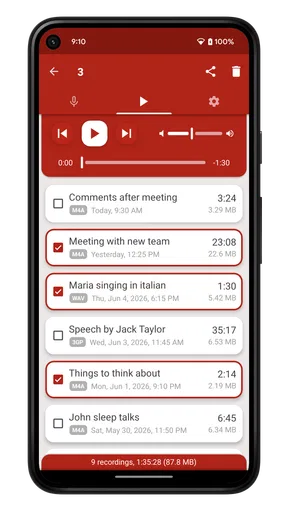
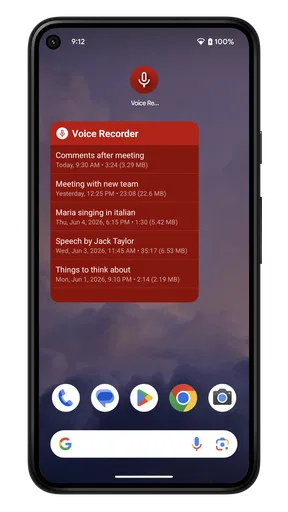
Our Review of Voice Recorder Pro
 Analysis by Appyee
I usually reach for a voice recorder when my hands are busy or a thought is too detailed to type. In that moment, the best tool is the one I can start without planning ahead. Voice Recorder Pro is built around that simple job: it is a free recording app from Splend Apps, in the music and audio category, with a straightforward path from opening the app to capturing a sound. I’d consider it for quick notes, classes, interviews, and other situations where getting a usable recording matters more than producing a finished audio project.
When a quick recording is the goal
Picture a student leaving a lecture with a question about a topic that came up near the end. Rather than trying to remember the exact explanation later, they can open the recorder and capture a short spoken reminder while walking to the next class. The same approach works for a delivery detail, a rehearsal idea, or a reminder dictated on the way home. I find this kind of use more realistic than treating every recording as a formal production: most clips are there to help me remember or revisit something.
The app is rated for Everyone, and it has an average rating of 4.7 from around 1.4 million ratings. That broad response suggests it has served many different recording habits, though a high rating alone cannot tell me whether a particular workflow will suit me. What matters in practice is whether I can start recording quickly, keep the phone useful while capture continues, and find the result again when I need it.
From pressing record to using the audio
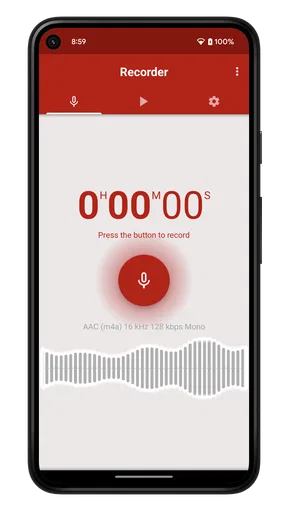
First off, diving into Voice Recorder Pro is incredibly straightforward. The app’s interface is clean and user-friendly, which means you won’t be scratching your head trying to figure out where everything is. You open the app, hit the big, shiny record button, and voilà — you’re recording!
That low-friction start is useful when the moment is brief. If I’m about to forget an idea, I don’t want to choose through a stack of menus before capturing it. A practical habit is to decide on a simple naming pattern before I build up a library—for example, starting titles with a subject or project name. That makes later searching less dependent on remembering when I recorded something.
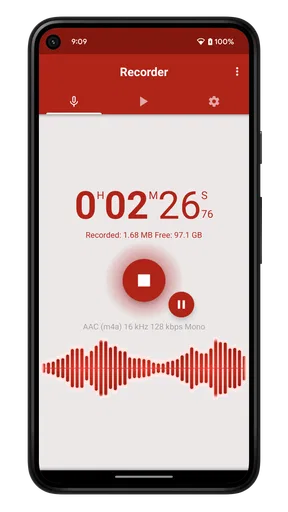
One of the standout features is the app’s ability to record in the background. So, if you need to switch apps mid-recording, you can do so without worrying about losing any audio. This is particularly handy for multitaskers who need to check emails or browse the web while recording.
Choosing a recording approach
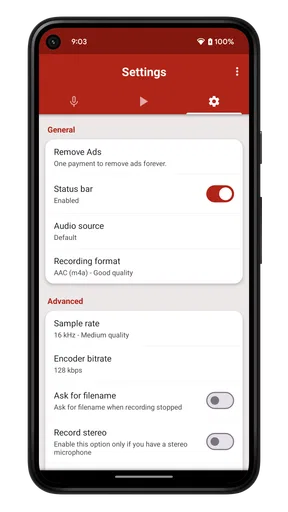
Now, let’s talk quality. The app offers several audio formats to choose from, including MP3 and WAV, ensuring you get the best quality for your needs. You can tweak the bit rate and sample rate, which is a nice touch for those who know their audio tech. This level of customization is what sets Voice Recorder Pro apart from some of the more basic recording apps out there.
Those choices are most useful when I match them to the job instead of always selecting the highest-looking settings. A spoken reminder that I plan to replay on my phone is different from a performance take I expect to edit elsewhere. Higher-quality settings can make sense when detail matters, while a more compact format can be more convenient for sharing and keeping lots of everyday clips. If I’m unsure, I’d make a short test recording, listen back through the phone speaker and headphones, and adjust before capturing a long session.
For those who love to tinker, the app also offers a variety of settings to play around with. You can adjust the gain to make sure your recordings are at the perfect volume. Plus, the app includes noise reduction features, which means your recordings will sound crisp even in less-than-ideal environments.
In my experience, settings like gain and noise reduction are better treated as tools to test than as automatic fixes. Raising gain may help a quiet speaker, but it can also make room noise more noticeable. Noise reduction can help with an imperfect setting, yet it is not a substitute for moving closer to the person speaking or choosing a quieter place. For an interview or class, I would do a brief sound check from the position where the phone will sit, rather than assume the recording will be clear because a processing option is enabled.
Keeping clips useful after recording
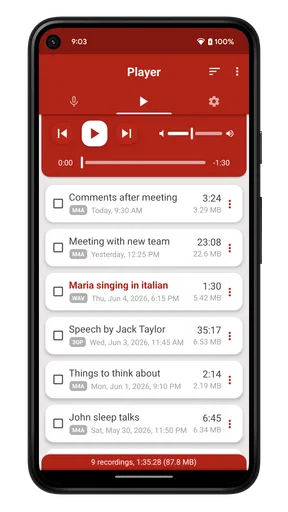
Once you have your recordings, the app makes it easy to manage and organize them. You can rename files, add notes, and even share them directly through email or other apps. The built-in file manager is intuitive, allowing you to sort and search your recordings with ease.
Adding a note at the time of recording can save more effort than it seems. A file named after a course or meeting is easier to identify than a generic title, and a brief note can explain why a short clip matters. For longer recordings, I’d make a note of the key subject or the section I want to revisit. That small bit of organization turns a folder of audio into something I can actually use instead of a collection I have to replay from the beginning.
One feature I particularly enjoy is the ability to trim and edit recordings directly within the app. If you’ve ever recorded a long lecture but only need a snippet, this function is a lifesaver. It saves you from having to export the file to another program just to make minor edits.
Trimming is especially handy for removing a long pause at the start or end, or isolating a passage before sending a clip to someone. I would keep the original intact whenever a recording is important, then share a trimmed copy if I only need to pass along one section. That is a sensible safeguard for interviews, classes, and work discussions, where an edit made in a hurry could remove context that later turns out to matter.
Handing recordings to other apps
Sharing your recordings is a breeze. The app integrates with cloud services like Google Drive and Dropbox, so backing up your files is seamless. This makes it easy to access your recordings from any device, which is a must for those of us who are always on the go.
For a reliable handoff, I would check that the audio has finished recording and is saved before switching to a sharing workflow. A useful routine is to rename the file, add a note, listen to the start and end, and then send or back it up. That quick review can catch an accidental pause, a muffled opening, or the wrong clip before it reaches a classmate or colleague. Cloud storage is convenient, but it works best when the recording is clearly named and I know which copy is the one I intend to keep.
Moreover, if you’re into podcasting or creating content, you’ll appreciate the direct sharing options to platforms like SoundCloud. It’s one of those features that really showcases how Voice Recorder Pro caters to both casual users and professionals alike.
I see those sharing options as a bridge rather than a complete publishing workflow. They can make it easier to move a recording toward a service or another app, but recording and sharing are not the same as editing a polished episode. Someone building a podcast with multiple tracks, detailed sound cleanup, or a structured production process will probably want a dedicated audio editor as well. For a single voice memo, an interview reference, or a rough spoken draft, keeping the capture and basic trim in one place is more convenient.
Where it fits—and where it does not
Compared with the basic recorder that may come preinstalled on a phone, this app’s appeal is the combination of recording choices, file management, trimming, and ways to pass audio along. A minimal built-in recorder can be the better pick if all I need is one tap and a short memo, especially if I prefer not to adjust settings. At the other end, a dedicated audio workstation is a better fit for complex editing, layered sound, or a final production that needs careful mixing. This app sits comfortably between those extremes: more adaptable than a bare-bones memo tool, without turning a quick recording into a production session.
It is also not the right choice for every kind of note-taking. If I need searchable written notes, automatic transcription, or a task list built from what was said, a transcription or notes app may serve me better. If the recording is sensitive, I would also think carefully about where I store and share it, and follow the rules of the class, workplace, or conversation. A recorder captures sound; it does not decide whether recording is appropriate or replace a careful handoff.
For everyday use, I’d recommend it most to students who want to revisit spoken explanations, people who dictate ideas while away from a keyboard, and anyone who occasionally needs to preserve a conversation or rehearsal for personal reference. It is less compelling for someone who only records once in a while and wants the fewest possible choices, or for a creator who expects professional editing controls in the recorder itself.
Practical details before you settle in
The app is free to download, with in-app purchases priced at $1.99 per item. It was released on Oct 21, 2014, and its current version is 4.0.1, with Android 6.0 as the minimum operating system. It has passed 100 million installs, which makes it a familiar option in the category, but the right fit still comes down to whether its recording and organizing flow matches how you work.
If you are wondering whether you need audio experience to use it, I would say no: the basic record-and-save routine is approachable, while format and recording-level options are there for people who want more control. If you are unsure which format to choose, test a short clip and consider how you will listen to or share it. If you are recording a long class or meeting, check the sound at the beginning and make sure the phone is positioned sensibly; a simple test is more useful than discovering a problem after the event.
For anyone planning to share audio, the practical question is not only whether the app can send a file, but whether the recipient can open and use it. A common format and a clear filename make that handoff easier. If a clip is important, keep a backup in a place you can find later and avoid editing the only copy. Those habits are not complicated, but they can prevent a useful recording from becoming difficult to locate or recover.
A dependable choice for ordinary recording
In a world where capturing audio can sometimes feel like an afterthought, Voice Recorder Pro stands out as a reliable and versatile tool. It’s not just about hitting record; it’s about capturing moments with precision and ease. Whether you’re a student, a journalist, or just someone who loves to record their thoughts, this app is a fantastic addition to your toolkit.
My recommendation is simple: try it if you want a recorder that starts easily but gives you room to manage, trim, and share your clips afterward. Keep your setup modest until you know what your recordings need, and use a short test whenever the sound matters. If your priority is transcription, advanced production, or a recorder with virtually no settings to think about, another kind of app may be a better match.
So, if you’re in the market for a robust and user-friendly voice recording app, give Voice Recorder Pro a try. It’s available for both Android and iOS, and you can find the download links on our site. Happy recording!
Verdict
Strengths of Voice Recorder Pro
- High-quality audio recording capabilities.
- User-friendly interface with intuitive controls.
- Supports multiple audio formats for flexibility.
- Allows easy sharing via email or cloud services.
- Offers advanced editing tools for precision.
Limitations of Voice Recorder Pro
- Contains in-app ads that can be distracting.
- Some features are locked behind a paywall.
- Limited cloud storage options available.
- Occasional bugs reported during playback.
- Interface can feel outdated to some users.
Similar Picks in This Category
View All
YouTube Music
Google LLC4.4

Samsung Music
Samsung Electronics Co., Ltd.3.8

Spotify: Music and Podcasts
Spotify AB4.3

JioSaavn - Music & Podcasts
Saavn Media Limited4.3

Lark Player:Music Player & MP3
Lark Player Studio - Music, MP3 & Video Player4.6

StarMaker: Sing Karaoke Songs
SKYWORK AI PTE. LTD.4.3
Frequently Asked Questions
What features does Voice Recorder Pro offer?
Voice Recorder Pro provides high-quality audio recording, editing tools, and easy file management. It supports multiple audio formats and offers cloud integration for seamless file sharing. The app also includes features like noise reduction, playback speed control, and bookmarking, making it versatile for both casual and professional use.
Is Voice Recorder Pro compatible with all devices?
Voice Recorder Pro is available for both Android and iOS platforms. It is optimized to run smoothly on a wide range of devices, though it’s always recommended to check the specific OS version compatibility in the app store before downloading to ensure optimal performance.
How user-friendly is the app for beginners?
Voice Recorder Pro is designed with an intuitive interface that is easy for beginners to navigate. With clear icons and straightforward controls, users can quickly start recording and accessing features. Additionally, there are tutorials and tips within the app to guide new users through its functionalities.
Does Voice Recorder Pro offer cloud storage options?
Yes, Voice Recorder Pro integrates with major cloud services like Google Drive, Dropbox, and iCloud. This allows users to easily back up their recordings and access them from any device. Cloud integration ensures that your audio files are safe and can be shared or transferred effortlessly.
Are there any in-app purchases or ads in Voice Recorder Pro?
Voice Recorder Pro offers a free version with basic features and occasional ads. For users looking for an ad-free experience and additional features such as advanced editing tools, there is a premium version available through in-app purchases. This allows users to choose based on their needs and preferences.
